How to Build an Aesthetic Yet Functional Desk Setup With Peakzooc
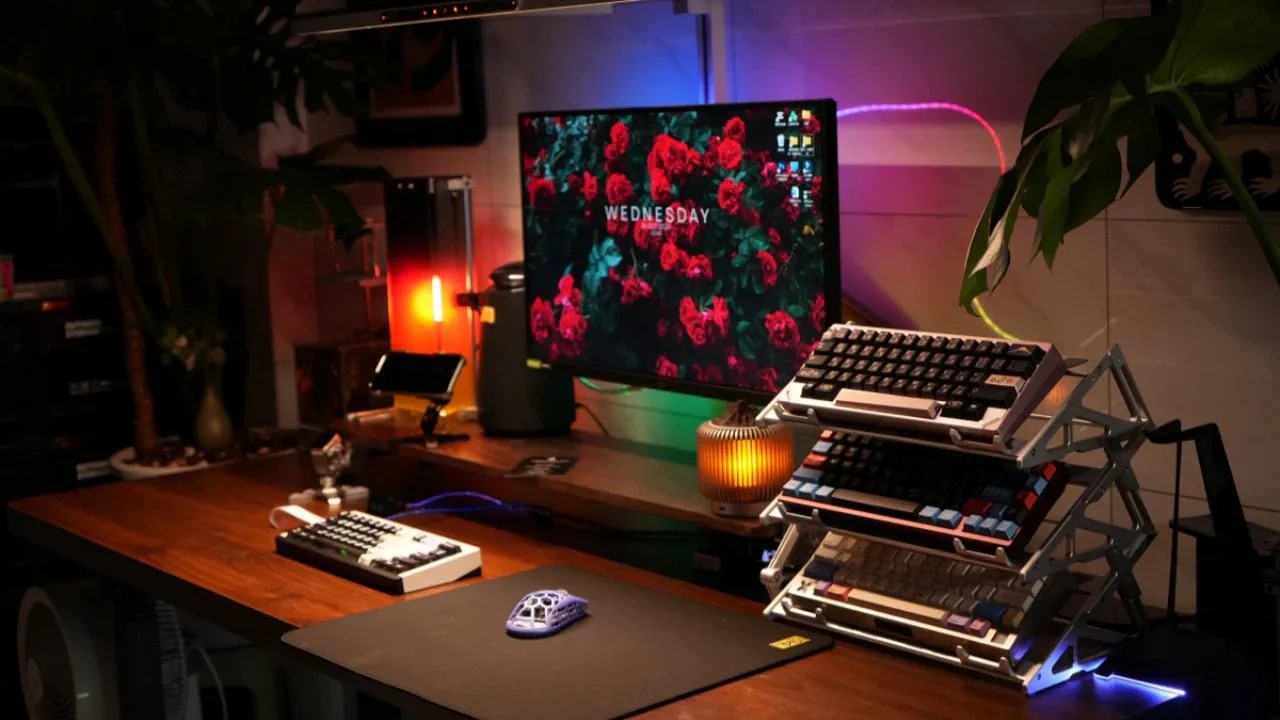
A desk setup affects comfort, focus, and daily work habits. A good setup should look clean while supporting useful tasks. Many desks become cluttered because items lack clear placement. Combining appearance and function helps create a balanced work environment. Peakzooc aesthetic desk setup focuses on structure, materials, and practical layouts. These features help form a setup that feels organized and visually calm. Building such a space requires attention to placement, height, and tool choice.
Start With a Stable Desk Foundation
A desk surface should be strong enough to hold multiple devices. Stability prevents shaking during typing or device movement. A monitor riser can lift screens to a better eye level. This reduces neck strain during long working hours. The Peakzooc AR01 Armor Riser offers a firm aluminum platform. Metal construction supports weight without bending or wobbling over time. Extra space under the riser can store small daily items. This keeps the top surface open and less crowded.
Elevate Key Devices for Better Layout
Lifting devices off the desk creates visual order and more space. A keyboard stand helps position keyboards when not in use. The Apex Keyboard Display Stand uses a stacked, modular metal design. This allows keyboards to rest safely without touching the desk surface. Raised placement also highlights the keyboard as part of the setup. Keeping devices elevated reduces dust contact and accidental liquid spills. Organized vertical storage supports both function and clean appearance.
Add a Reliable Phone Stand
Phones often sit loosely on desks, causing clutter and missed alerts. A MagSafe phone stand keeps the device upright and visible. Peakzooc aluminum stands use strong magnetic alignment for stable holding. Adjustable arms allow different viewing angles for calls or media. This keeps the phone in one clear position throughout the day. A fixed spot prevents constant searching for the device. Visual order improves when each object has a defined location.
Manage Audio Controls With Physical Tools
Volume controls on screens can slow down quick adjustments. A desktop volume knob provides direct control through a simple turning motion. The Peakzooc desktop control knob uses solid aluminum construction. A physical dial allows fast sound changes during work or gaming. The weight keeps the knob steady during repeated daily use. Simple tools like this reduce distractions caused by software menus. Practical control devices improve workflow while keeping the desk organized.
Use Lighting to Improve Mood and Visibility
Lighting affects both mood and visibility during desk work. A small ambient speaker light can provide soft background illumination. The Peakzooc Rhythm Light combines audio output with synced light effects. This is to make it more atmospheric without consuming much desk space. The light is soft, and therefore the eye is not strained like when using harsh overhead lights. The visual consistency can be similar in color tones, matching the desk theme. Balanced lighting supports comfort while keeping the setup visually appealing.
Keep Small Items Organized
Loose cables and small tools quickly create desk clutter. An organizer stand or docking station keeps these items together. Modular organizers allow devices, controllers, or tools to have fixed places. Grouping related items reduces searching time during daily tasks. Storage areas below raised platforms hide items without removing access. Clean surfaces help maintain a calm and focused environment. Orderly storage plays a key role in both function and appearance.
Match Materials and Colors
Visual harmony comes from using similar materials across desk accessories. Aluminum finishes create a consistent, modern appearance on the desk. Matching colors between stands, knobs, and risers strengthens the theme. Silver or black tones often blend well with electronics. A unified look prevents the desk from feeling crowded or mismatched. Consistency in finish helps even simple tools look intentional. Aesthetic balance supports long-term satisfaction with the setup.
Focus on Comfort and Practical Reach
Items should sit within easy reach to avoid constant stretching. Frequently used tools belong near the main working area. Raised monitors and stands should match eye and hand positions. Proper spacing reduces strain on shoulders, wrists, and neck. A functional layout always supports natural movement first. Aesthetic choices should not block access to essential devices. Comfort and efficiency remain the basis of any successful desk setup.
Balance Open Space and Equipment
An effective desk setup includes both tools and empty surface areas. Too many items make the space feel crowded and stressful. Leaving open areas creates visual breathing room and easier cleaning. Each accessory should serve a clear purpose in daily use. Removing unused items improves both function and appearance. A balance between equipment and open space keeps the desk practical. A clear layout helps the mind stay focused on tasks.
Conclusion
A functional but attractive desk system is based on design and proper positioning. The presence of raised platforms, stands, and organizers is used to create clear areas. Matching materials create visual harmony while supporting durability. Good lighting and physical controls improve comfort during long sessions. Stored order eliminates messiness and endorses everyday effectiveness. Layout decisions must be made with comfort in mind first before making any visual style decisions. Desks are relaxed and practical when they are accompanied by the tools and space. An appropriate arrangement will facilitate a conducive working environment as well as fun.